Short answer: these golf simulator nets and screens offer safe, contained spaces for indoor and garage practice, with projector-ready surfaces and sturdy framing. This guide highlights five top options suited to different spaces and budgets. Best for dedicated home setups are enclosure packages with built-in projector mounts; best for casual players are lighter, easier-to-assemble nets with high-density screens. The buyer’s table below helps compare core specs at a glance.
| Product | Best For | Key Benefit |
|---|---|---|
| GoSports Range Cage 10 ft x 8 ft | Mid-sized home studios | Simulator-ready impact screen and sturdy cage |
| ANYTHING SPORTS Complete Golf Simulator Enclosure | Serious practice spaces | All-in-one enclosure with projector mount |
| IDEATRY Golf Simulator Enclosure | Budget-friendly, durable setup | 270° protection with thick net and upscale screen |
| GoSports 10 x 8 ft Enclosure Set | Compact home setups | Commercial-grade impact screen and quick install |
| MangoStar 11×8 ft Net | Large indoor/outdoor use | HD impact screen and sturdy frame |
GoSports Range Cage 10 ft x 8 ft Golf Practice Hitting Net

The enclosure uses side and top netting to contain high-speed shots, enabling driver, iron, and wedge practice with minimal ball chasing. It includes an impact screen that doubles as a backstop for projecting a simulator image, making it a practical choice for a home setup (launcher or projector not included). The frame is reinforced for frequent use, and a foam-padded base helps absorb impact and reduce rebounds.
Best for: players building a dedicated practice space with a contained area and a projector setup. Better for: users who want a ready-for-simulator surface without expensive custom builds. Caution: ensure ceiling height and room width accommodate the cage dimensions to avoid interference with walls or fixtures.
Complete Golf Simulator Enclosure Package – 4K-Ready Impact Screen

This all-in-one enclosure is designed for serious golfers who want a professional-grade home practice space. It features a projector mount and all required poles, delivering a complete visual and safety setup. What’s not included: turf and projector, which are shown in images for demonstration. The package emphasizes durability, safety, and a clean look in a garage or dedicated room.
Best for: golfers seeking a professional-grade home studio without custom building. Choose this if you want a turnkey enclosure and projector-ready surface. Limitation: turf and projector must be sourced separately, which adds setup steps and potential extra costs.
IDEATRY Golf Simulator Enclosure With Net & Target
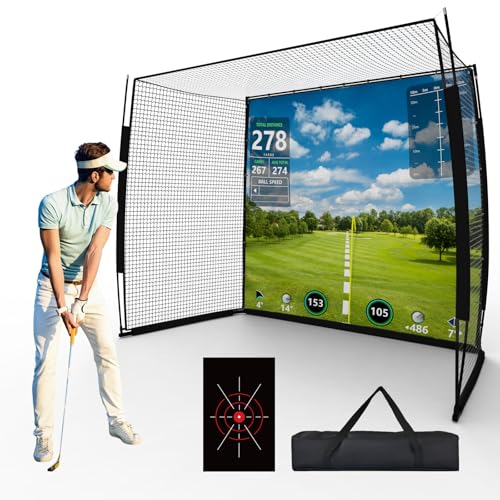
This 3-in-1 home studio combines a premium impact screen, a target sheet, and a pro practice net. The frame uses powder-coated steel bases and fiberglass poles for stability, with a thick 6-ply net designed to stop ball speeds up to 250 mph. The enclosure provides 270° protection with side and top nets, keeping shots inside a defined area for year-round indoor or outdoor use.
Best for: gamers who want a robust, all-in-one setup with strong ball-stopping capability. Better for: garage or basement spaces where 270° coverage helps prevent damage to surroundings. Caution: projector compatibility is not included and should be sourced separately; ensure your projector fits the screen dimensions.
GoSports 10 x 8 ft Golf Simulator Enclosure Net – Complete Set

This enclosure emphasizes a commercial-grade, heavy-duty impact screen designed to withstand frequent high-speed impacts and provide a stable projection surface for launch monitors. It’s marketed as an easy-install solution with clear instructions, suitable for users eager to maximize practice time at home with reliable enclosure performance and a clear screen for projection.
Best for: users seeking an efficient, durable enclosure with clear setup guidance. Better for: smaller-to-mid-sized spaces where a straightforward install is valued. Caution: actual projector or turf is not included in the core package, which may require additional purchases.
MangoStar Golf Net, 11x8ft With HD Screen and Target Cloth

This MangoStar setup combines a large capacity net with an HD impact screen and a separate target cloth for precision practice. It supports a wide range of practice modes and is suitable for indoor and outdoor use due to its robust steel frame. The screen’s high-density weave aims to deliver clear projected images for a realistic simulator experience.
Best for: buyers needing a larger practice area and a combined screen-and-net solution. Choose this if you want a roomy enclosure that still accommodates indoor spaces. Limitation: the projector is not included, so you’ll need a compatible projector to use the screen effectively.
Buying Guide: Key Considerations For Your Golf Simulator Space
- Space and Size: Measure room width, height, and depth. Choose enclosures that fit without crowding doors or fixtures. Larger nets provide more swing room but require more space.
- Screen Type And Projection: High-density impact screens reduce ball rebound and improve projection clarity. Ensure your projector compatibility and throw distance align with the screen size.
- Frame Materials: Look for reinforced steel frames and fiberglass poles for durability. Foam padding at the base helps reduce floor damage and rebound.
- Coverage: 270° wrap offers better containment for powerful swings. If you have a small space, select a model with front-and-top protection to minimize stray balls.
- Setup And Maintenance: Some packages include projector mounts and all necessary poles. Assess if turf or additional netting is needed for full coverage.
- Budget And Future Upgrades: All-in-one enclosures streamline setup but may limit customization. Consider whether you might upgrade to a higher-end simulator later.
Frequently Asked Questions
- Do I need a projector with these enclosures? Most options are projector-ready or projector-optional. Check if your system includes or requires a separate projector for full use.
- What is the typical installation time? Timelines vary, but multi-piece enclosures with clear instructions commonly take a few hours for setup and tensioning.
- Is the screen sufficient for all golf simulations? High-density screens support most standard simulators, but verify compatibility with your specific launch monitor or software.
- Can these enclosures be used outdoors? Many models are designed for indoor or garage use, with some weather resistance. Always protect electronics from the elements.
- What maintenance is required? Regular inspection of netting and poles helps prevent wear. Clean screens per manufacturer guidelines to preserve projection clarity.
- Are there space-saving options? Yes, several 8×10 or similar-sized cages exist that balance swing room with compact footprints for smaller rooms.